
A customer signs up. Sales records the deal. Support opens an account. Finance raises the first invoice. Three teams, three systems, one customer — and within a month the three versions quietly disagree. The phone number is current in one place and stale in two. Nobody changed it on purpose. The structure made the drift inevitable.
Your organisation is not one team. It’s a dozen of them, each with its own way of working, all depending on each other to get anything done. How a tool handles that single fact decides how much context leaks out of the gaps between those teams every day. Most tools pick one of two bad answers.
The two bad answers
One structure for everyone. Choose a single shared setup and fit every team into it. Now the tool suits nobody especially well, and the teams whose work doesn’t match start keeping their real records somewhere else.
A separate tool per team. Let each team choose its own. Each one fits beautifully, and the organisation ends up in pieces — the same customer, order, or case recorded in three systems that slowly disagree, exactly as above.
One answer trades away fit. The other trades away connection. Plenty of companies pay both bills at once, running a rigid central system and a drawer full of side spreadsheets.
Groups give you the fit
In Timill, a group is a shared workspace for the people who do the same kind of work and need the same information in front of them — a process, or a whole department. It has its own item types, statuses, dashboards, roles, forms, and rules. Whatever makes that work specific lives inside the group, so the tool fits the people in it without dragging the rest of the company along.
The instinct that serves you best is to keep groups broad. Put everyone who collaborates directly, and works off the same records, in one shared space — so they’re never reconciling separate copies. Reach for a separate group only when the work and the people genuinely diverge: a different process, a different set of hands. Fit comes first, inside each group. Connection comes next, on purpose.
Links give you the connection
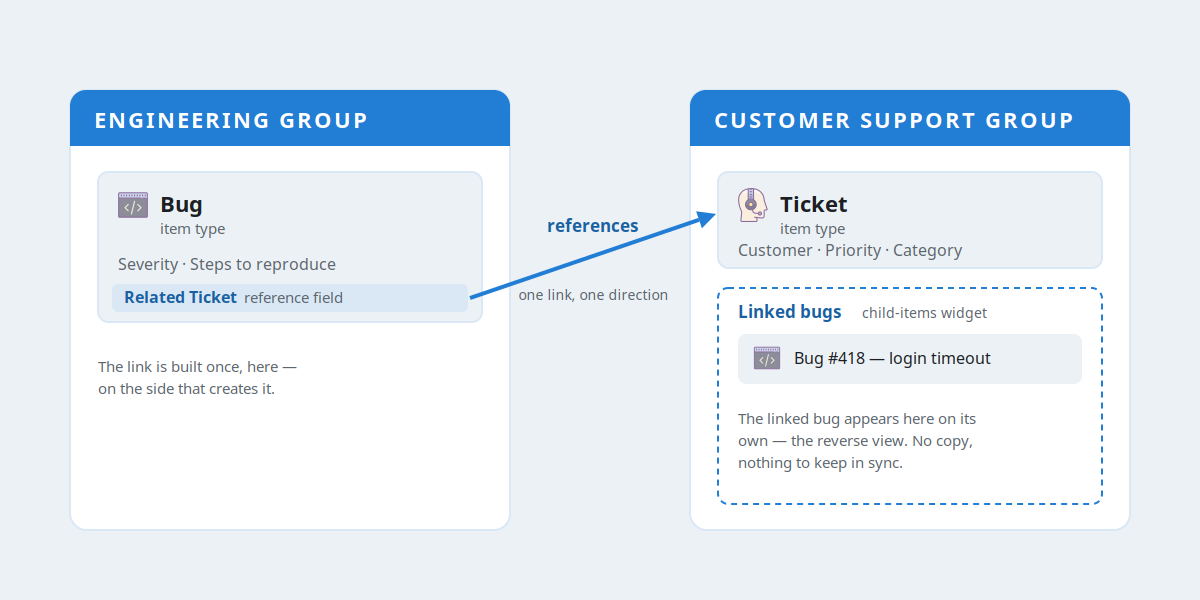
When work does cross from one group to another, an item in one can point to an item in the other through a reference field. You build that link once, on the side where the connection naturally happens. The other side picks it up automatically through a reverse view — the child-items widget — where the related items appear, and where you can create a new one on the spot.
The detail that matters: the link lives in one place, pointing one way. There’s no mirror copy on the other side waiting to fall out of step. One relationship, one source, read from both ends. Cross-group links like these are part of Timill Pro; Timill Teams keeps everything inside a single group.
What this buys you
- Hand-offs stop being risky. Work referenced across groups moves between teams without anyone re-typing it.
- One record, not several that argue. Information is referenced, never copied, so there’s a single version to trust.
- Reporting can cross the whole organisation. Because the relationships are real data, not something stitched together by hand, you can report across the organisation instead of one team at a time.
In practice: the everyday version
The diagram above is the simplest case. A bug in the engineering group references the support ticket that prompted it. Engineers see exactly which customer issue is driving the work. On the support side, that linked bug appears on the ticket by itself, and an agent can raise a new one without leaving the page. One link, built once, serving both teams — and nobody re-keys a thing.
Use cases: the same model, bigger work
The model doesn’t change as the work gets heavier — only the number of groups, and the links between them, grows. Three examples from very different industries, all built the same way.
Energy: an EPC project
Picture an EPC contractor building a grid substation — engineering, procurement and construction running in parallel against a fixed deadline. The programme splits into the groups you’d expect: Engineering owns the design packages and drawings, Procurement runs the purchase orders for transformers, switchgear and cabling, and Construction manages the site work packages and inspections. Each is a shared space, shaped to that discipline and to the people working in it.
The links carry the dependencies that decide whether the job lands on time:
- A construction work package references the engineering design package it’s built from, so the site crew always opens the current revision — and when a drawing changes, every work package that depends on it shows it.
- A purchase order references the equipment the engineers specified, and the work package references that order. A site supervisor can see, right on the work package, whether the transformer has arrived before the crew is booked to install it.
Revise a drawing once, and everyone connected is looking at the same version — no chasing email threads, no superseded drawing installed by mistake. Hundreds of moving parts across three disciplines, and one set of facts underneath them.
Healthcare: a clinical network
A clinic network runs Patient Care, Diagnostics and Billing as separate groups. Clinical visits, lab work and finance look nothing alike, and the people doing them differ — but a single patient’s record has to hold together across all three.
- A lab request in Diagnostics references the appointment in Patient Care it belongs to, so results land against the right visit and the clinician sees every linked request from the appointment itself.
- A charge in Billing references the same appointment, so finance traces every invoice back to the care that generated it — without re-keying patient details or guessing which visit a charge belongs to.
A clinician opens one appointment and sees the visit, its lab requests and what was billed, instead of logging into three systems and hoping they agree.
Manufacturing: make-to-order production
A make-to-order manufacturer splits into Sales, Production and Procurement — three different rhythms, from quote to shop floor to supplier.
- A production work order references the sales order it fulfils, so the shop floor sees exactly what was promised, and the salesperson watches build progress on their own order without chasing anyone.
- A material purchase order references the work order that needs it, so a planner can see whether the steel is on its way before scheduling the run.
From a single sales order you can follow the thread all the way to the parts on the dock — one connected chain, not three lists that have to be reconciled by hand.
Letting each team keep its own shape while connecting their work on purpose is how Timill keeps a whole organisation up to date, instead of leaving you a set of tidy lists that don’t talk to each other.
Curious how this would look for your team? Book a 30-minute conversation — at your pace, no commitment.